“Works on my machine” is the most expensive sentence in software. A bug caught by a test costs a minute. The same bug caught by a customer costs money, support time and trust. So between a developer's laptop and the customer there should be a path every change takes the same way – with checks at each step.
That path is made of three things: environments, branching rules and testing.
Environments: three backstage, one on stage
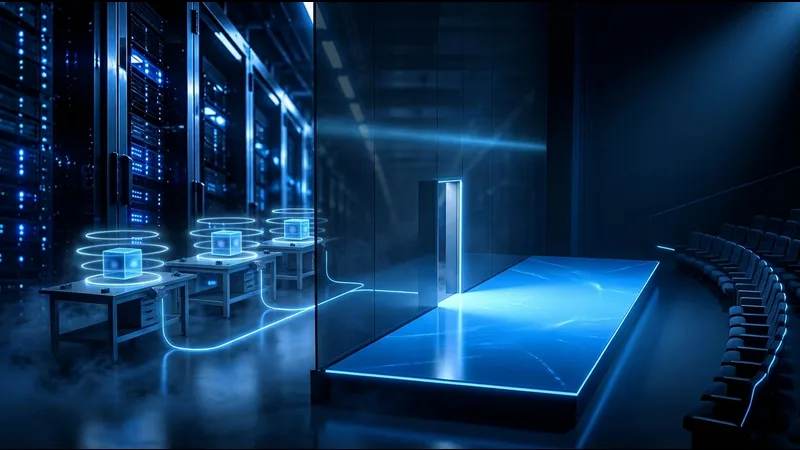
Think of a theatre. The audience only sees the stage – but the show is made behind the curtain: rehearsals, costumes, the dress rehearsal. If you rehearse in front of the audience, every mistake is public.
Backstage – customers never see this
Stage
the same build passes through all four →
- Local – the developer's machine. Fast, for experimenting. Mistakes here cost nothing.
- Dev / test – a shared environment where the whole team's changes come together. The first place you see whether your change works alongside everyone else's.
- Staging – the dress rehearsal. As faithful a copy of production as possible: same versions, same configuration, similar data volumes. This is where final checks and load tests happen.
- Production – the stage. What customers see. You don't rehearse here – you only perform what has already passed every check.
The rules that make environments useful
- The same build goes through every environment. You don't build a new version for production – the one that passed staging is simply promoted. If you rebuild, you've tested something other than what you're shipping.
- Only configuration differs. Addresses, keys, passwords – kept separate from the code, per environment. Production keys never live on staging.
- Staging resembles production. If production runs on three servers behind a load balancer and staging on one laptop, staging won't catch problems with sessions, caching or message queues.
- Test data is anonymised. Realistic volumes and shapes of data, but never real customers' personal data.
- The database takes the same path as the code. Migrations run automatically in every environment, in the same order. We wrote about that here.
Gitflow: order in your branches
Environments say where code gets checked. Branches say which code is ready for which environment. Gitflow is one of the best-known agreements about that:
← swipe to see the whole diagram →
main– only what's in production. Every release is tagged, so you always know exactly what shipped.develop– where finished features collect for the next release. Deploys automatically to dev/test.feature/…– every new thing in its own branch, fromdevelop, and back intodevelopthrough code review.release/…– release preparation: fixes only, no new features. Goes to staging, then intomain– and back intodevelopso the fixes aren't lost.hotfix/…– an urgent production fix, frommain, merged back into bothmainanddevelop.
What's where: versions and tags
Once code heads for staging and production, branches are no longer enough – a branch moves with every new commit. That's where release tags come in: immutable labels on exactly one commit.
- Staging gets a release candidate. The
release/1.1branch produces the tagv1.1.0-rc.1. If QA finds a bug, the fix goes into the same release branch and becomesv1.1.0-rc.2. Staging always runs exactly one named candidate. - Production gets the final tag. When a candidate passes every check,
v1.1.0is placed on the same commit that wasrc.2– and production receives the same package that was tested, not a new build. - The package carries the version. A Docker image or archive is labelled with the version and commit (e.g.
app:1.1.0-rc.2), never just “latest”. You always know where it came from. - Every environment says what it's running. A small endpoint (e.g.
/version) or a response header returns the version, commit and release time. One request tells you what's on staging and what's in production – no more “who deployed last?”. - Releases are recorded. CI/CD logs every release: which version, to which environment, when, and who approved it. Rolling back means redeploying the previous tag – not hunting for old code.
| Environment | From | What it runs |
|---|---|---|
| Dev / test | develop | latest commit a41f9c2 |
| Staging | release/ | candidate v1.1.0-rc.2 |
| Production | main | final tag v1.1.0 |
v1.1.0 sits on the same commit as rc.2 – production runs exactly what passed staging. Labels are illustrative.For smaller teams shipping several times a day, a trunk-based approach is often simpler: short branches that live a day or two, quick merges into main, and unfinished features hidden behind feature flags. Which model you choose matters less than everyone following it – and automation enforcing it, not memory.
Code review: four eyes
No change goes into a shared branch without a second pair of eyes. Code review isn't about blame – it's the cheapest test there is. A good review asks: is the change understandable, does it have tests, does it touch the database or configuration, and what happens if it goes wrong. Branch protection in Git makes it mandatory: no approval and no green tests, no merge.
Testing: a pyramid, not a tower
You want many tests where they're fast and cheap, and few where they're slow and expensive. If it's the other way round – lots of manual clicking, little automation – every release takes days and bugs still slip through.
- Unit tests (many, fast) – check individual functions. Run on every change, in seconds.
- Integration tests (fewer) – do the parts work together: code and database, service and message queue, your system and the payment provider in test mode.
- End-to-end tests (few, essential) – a browser walks through the most important flows: sign-in, cart, payment. They're slower, so they cover only what makes money.
- Manual, exploratory QA on staging – a person trying to “break” the new feature in ways no test anticipated: odd inputs, slow network, a phone, a double click.
Beyond the pyramid, two things are mandatory: a smoke test after release – a handful of automated checks on production right after shipping – and a way back: if the smoke test fails, the previous version returns with one click, no panic.
How it fits together
This is the path of a single change, from idea to customer. Everything except the last two steps happens backstage:
- Pull request
- CI: unit + integration tests
- Code review
- Merge
- Dev / test
- Staging: E2E + manual QA
- Same build to production
- Smoke test (or roll back)
Every step leaves a trail, so you always know which version is where, who approved what and which tests passed. When something goes wrong, it's not a mystery – it's a list.
What to measure
- How long it takes from merge to production. If it's weeks, changes pile up and every release becomes risky.
- How often a release has to be rolled back. It shows how many bugs get through backstage.
- How quickly you can restore the previous version when you need to.
- How many bugs customers report rather than tests.
Where to start
You don't need it all at once. The biggest difference usually comes from three steps: automated tests on every pull request, a staging environment that resembles production and one-click releases with a way back. The rest can be built up over time. If you're not sure where your team stands today, that's a good topic for an audit.